For Users
Twenty47 allows simple input of basic dispatch information. This data is then pushed to email or SMS subscribers. For most users, there are 2 forms available.
The Dispatch Create form
The use of Dispatch Create should be self-explanatory. Upon submission, Dispatch Create sends a notification to all subscribers.

The Subscriber form
This form is also self-explanatory. What happens after pressing “Save” does, however; require more explanation. Also before selecting “SMS Phone”, make certain you have a phone capable of receiving SMS text messages and you are aware of any fees your service provider might charge.
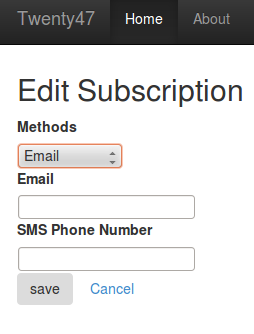
Effects of Subscriber form
All subscribers must be approved before they are allowed to receive notifications. Once you submit your subscription request, a Subscription Manager receives an email notification of your request. The Subscription Manager must then approve your request. Once your request is approved, you will receive confirmation notices for your email or your SMS phone.
Email Confirmation
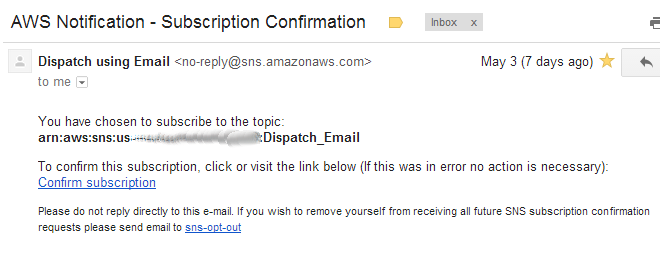
Once a Subscription Manager approves your request, you will received an email requiring you to confirm your request. This will come from Dispatch using Email <no-reply@sns.amazonaws.com>. Click the included link to complete your subscription.
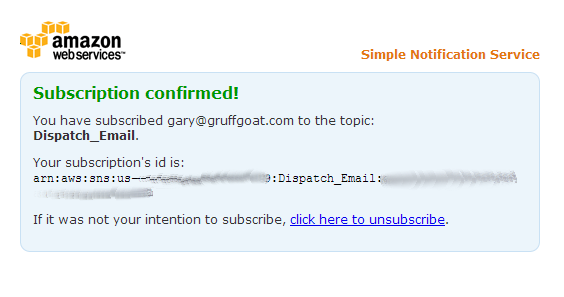
Once you have confirmed, you will be directed to a page similar to this:
SMS Phone Confirmation
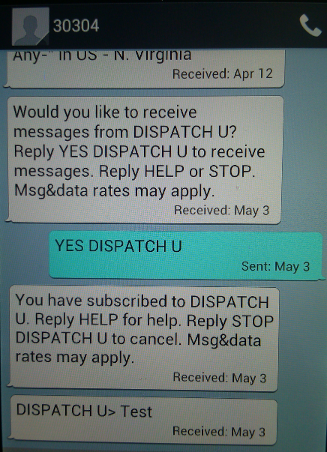
Once a Subscription Manager approves your request, you will receive an SMS text requiring you to confirm your request. That SMS will come from 30304. You must then reply “YES DISPATCH”. Finally, you will receive a confirmation. All SMS notifications will come from 30304 and include “DISPATCH>”
See the image to understand this more clearly.
Changing Subscription
Once your subscription is approved, you may return to the Subscriber form to make any changes you wish.
Resending Confirmation
Ocassionally, it may be neccessary to resend the subsciption confirmation email or text. Once you are approved for subscriptions, a resend confirmation button appears on the form.